
Forklift for Loading Docks: A 2026 Buying Guide
Posted by United Lift LLC on
What if a forklift meets your capacity target but cannot turn comfortably between the dock and trailer? Choosing a forklift for loading docks takes more than checking a capacity rating. The truck must handle your loads, fit the route, cross the dock interface appropriately, and support the pace of your operation.
This guide gives you a practical way to compare forklifts against your actual dock and workflow. You’ll assess load weight and dimensions, trailer and dock clearances, maneuvering space, operating conditions, and power source. The goal is to judge the whole application, not one specification in isolation.
You’ll also learn how to compare forklift options and weigh new against pre-owned equipment. United Lift offers forklifts from Hyster, Yale, Toyota, and Caterpillar, along with financing options. Use the checklist to define your requirements and focus your search on trucks suited to the job.
Key Takeaways
- Choose a forklift for loading docks by assessing the full route from dock to trailer and into the facility, not capacity alone.
- Use rated capacity as a starting point, then account for the load’s dimensions, load center, and any attachment when comparing candidates.
- Measure the dock and trailer interface, including maneuvering space and transitions, to judge how a truck will fit the work area.
- Document shifts, operator workflow, typical loads, and secondary tasks before building your pre-purchase checklist.
- Compare suitable new and pre-owned forklifts from Hyster, Yale, Toyota, and Caterpillar against your requirements.
What Makes a Forklift Suitable for Loading Docks?
A loading-dock forklift is selected for a route, not just a lift. It may collect a load from a staging area, cross a dock leveler or dockboard, enter a trailer, and carry goods into the facility. Every part of that trip affects equipment fit. A truck that can lift the load but cannot maneuver comfortably at the dock may slow the workflow and make routine moves harder.
A forklift for loading docks is a truck matched to the loads, clearances, transitions, and work cycle between the dock, trailer, and facility. That’s more specific than choosing a general-purpose forklift by rated capacity alone. Capacity is an essential starting point, but load dimensions, attachments, the crossing surface, and the frequency of travel all shape the application. For a broad introduction to forklift types and uses, see Wikipedia’s overview.
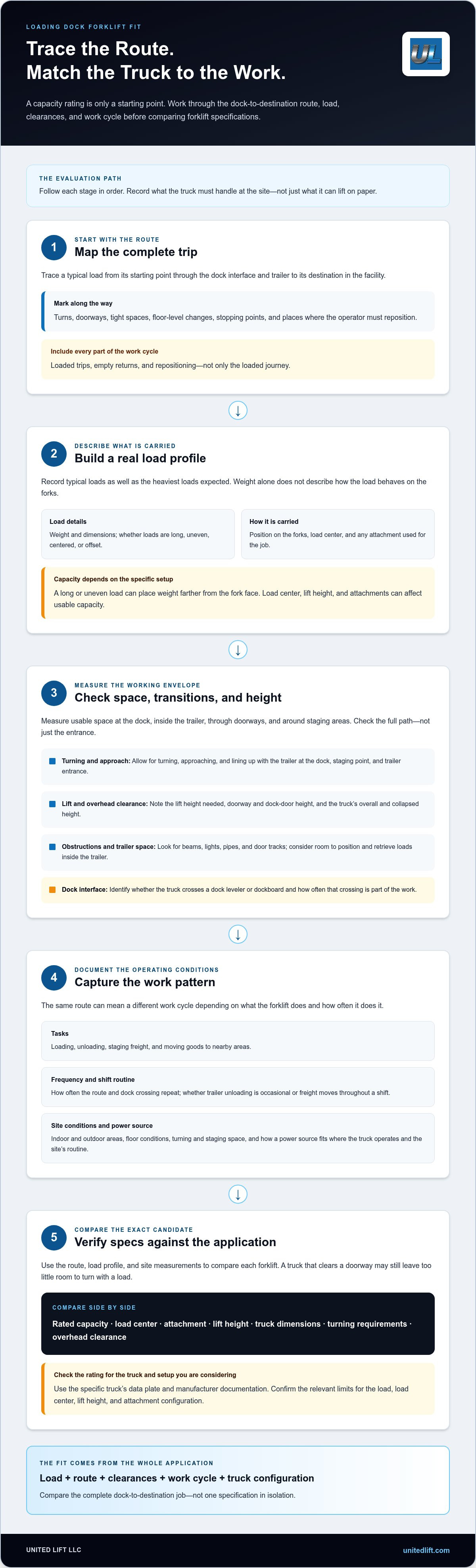
Start with a dock-to-destination map. Note where loads begin, each point the truck must pass, and where they end up. Mark doorways, tight turns, changes in floor level, and places where the operator must stop or reposition. This simple map makes the route easier to evaluate before you compare trucks.
Map the dock-to-trailer work cycle
Trace a typical load from staging, across the dock interface, and into or out of the trailer. Identify whether the job involves loading, unloading, staging freight, or moving goods to nearby areas. Record how often the truck crosses a leveler or dockboard, because repeated crossings are a regular part of the application. Include empty returns and repositioning, not just the loaded trip.
Identify the operating conditions before comparing trucks
List every area where the truck will work, including indoor-to-outdoor transitions. Measure usable space at the dock, inside the trailer, through doorways, and around staging areas. Document typical load dimensions and the attachments used. These details reveal handling and clearance requirements that a capacity figure alone cannot show. When comparing power sources, consider where the truck operates and how the equipment will fit into the site’s work routine.
Make the map useful by recording practical details at each stage:
- Route: Note the starting point, destination, turns, doorways, and dock-to-trailer crossing.
- Load: Record typical dimensions and how the load is carried, including any attachment.
- Frequency: Estimate how often the truck repeats the route and crosses the dock interface.
- Conditions: Mark indoor and outdoor work areas, floor conditions, and available space for turning and staging.
Consider the work pattern as well as the physical route. A truck used occasionally for trailer unloading may have a different daily cycle from one that moves freight among trailers, dock positions, and storage areas throughout a shift. Write down those differences before comparing options. With the path, loads, and routine documented, you can evaluate equipment against the work it must perform instead of relying on a single specification.
Which Forklift Specifications Matter at a Loading Dock?
Use your route and load information to compare specifications that affect the job. Rated capacity is essential, but it does not tell the whole story. Load weight, dimensions, position on the forks, and attachments can affect the truck’s usable capacity. The forklift’s dimensions and lifting range must also suit the dock, trailer, and facility.
Match capacity and load dimensions
Record the heaviest loads you expect to handle, along with their dimensions and position on the forks. A long or uneven load can place its weight farther from the fork face, changing the load center. Attachments also affect capacity. Use the specific truck’s data plate and manufacturer documentation to understand its rated limits in the configuration you are considering.
Compare candidates against your full load profile, not just the heaviest item. Note whether loads vary in shape, sit centered or offset, or routinely require an attachment. A published capacity may not apply unchanged at different load centers, lift heights, or attachment configurations. Confirm the relevant ratings for the exact truck and setup, and review its data plate and supporting documentation.
Check turning, lift, and overhead clearances
Measure turning space at the dock, staging point, and trailer entrance. Compare those measurements with the truck’s dimensions and turning requirements. Check the lift height needed at each destination, then account for trailer and facility constraints. Measure doorway and dock-door height, as well as overhead obstructions, against the truck’s overall and collapsed height.
Clearance checks should extend beyond door openings. Look for low beams, lights, pipes, door tracks, and other fixed obstructions along the route. Inside a trailer, consider the space available to position and retrieve loads at the required height. At the dock, include the room needed to approach, turn, and line up with the trailer. The NIOSH guidance on forklift safety and injury prevention offers additional context for considering hazards as part of equipment selection.
Match rated capacity, load center, attachment, lift height, truck dimensions, turning space, and overhead clearance to the actual site and load. Compare these specifications side by side. A truck that clears a doorway but leaves too little room to turn with the load may not suit the complete application. Likewise, reaching the required height is not enough if the truck lacks the appropriate capacity for the load and configuration.
- Capacity: Compare the load’s weight and position with the truck’s rated limits.
- Configuration: Include the attachment and confirm how it affects the rating.
- Fit: Check turning space, doorway height, collapsed height, and overhead obstructions.
- Reach: Compare required lift height with trailer and facility constraints.
These details make a forklift for loading docks comparison specific to your application instead of a guess based on one number. To review options against your measurements and load requirements, compare forklift options from United Lift.
How Do Dock Layout and Trailer Access Change Forklift Fit?
Available working space can vary from one dock position to another. One route may have a wide approach and a clear path into the trailer. Another may require careful positioning around staged loads, door frames, and other equipment. Compare the interface, turning room, and load movement at each position. A truck that fits one dock may not suit every door or trailer.
Include transition surfaces in your assessment. A dock leveler, portable dockboard, or trailer threshold affects how the truck approaches and crosses between surfaces. Record changes in height, uneven edges, floor condition, and available approach space. Do not apply a universal slope limit. If a technical threshold matters to your setup, refer to applicable guidance and the equipment documentation.
Assess the dock leveler, dockboard, and trailer threshold
Identify every surface the forklift crosses during normal work, including the leveler or dockboard and the trailer floor. Note whether the transition is smooth, uneven, or restricted by nearby staging. Limited approach space can affect how the truck lines up before crossing. Include these details in the application review rather than treating the dock plate as separate from the forklift route.
Compare dock approaches and working spaces
A roomy dock approach may leave more space to align and turn with a load. A constrained staging area or trailer entrance can require tighter positioning and more attention to load placement. Consider these differences before expecting one truck to handle dock work and other facility tasks. Record floor conditions and indoor-to-outdoor transitions along the route as well.
This comparison helps distinguish fixed site limits from preferences you can weigh when comparing options:
| Dock situation | What to assess | Why it matters |
|---|---|---|
| Roomy approach | Turning space, route to staging, and alignment at the trailer | Shows where there may be flexibility in truck fit and workflow. |
| Constrained staging or entry | Clearance around loads, door frames, and trailer entrance | Reveals pinch points that can limit turning or load positioning. |
| Leveler or dockboard crossing | Surface condition, transition, and approach space | Captures a routine part of the travel path that affects the application. |
| Indoor-outdoor route | Floor conditions and changes between work areas | Helps define the operating environment for comparing trucks. |
Mark each site detail as a fixed constraint or an operating preference. Doorway width, a fixed obstruction, and available trailer-entry space are constraints. A preferred staging arrangement or the option to use one truck for nearby moves may be workflow choices. This distinction keeps preferences from being mistaken for hard limits while keeping non-negotiable dimensions in view.
For a forklift for loading docks, compare candidates against the tightest point on the route, not just the most open area. Record where the truck must turn, where loads are positioned, and which transitions it crosses. Assess secondary tasks separately. A truck may suit a spacious dock approach but be a poor fit for a narrow trailer entrance, so consider the entire interface before deciding it can cover multiple jobs.
What Should You Check Before Buying a Forklift for Loading Docks?
A clear checklist helps you compare trucks against the real job rather than a single capacity figure or general impression. Document the work first, then assess each candidate against the same requirements. That keeps dock fit, operator workflow, and purchase considerations in view together.
Build a site and application checklist
Gather details from the people who handle dock work and understand the operating spaces. Record the route and daily routine, including shifts, busy periods, and intended secondary tasks. Separate must-have requirements, such as doorway clearance, from preferences you can weigh across candidates. Using the same checklist makes comparisons easier to review.
- Describe the workflow. Note whether the truck loads trailers, unloads them, stages freight, or moves loads elsewhere in the facility.
- Document shifts and frequency. Record operating patterns, how often loads move, and how frequently the truck crosses a dock leveler or dockboard.
- Define the load profile. Capture typical and heaviest load weights, dimensions, position on the forks, and any intended attachment.
- Measure the route. Record dock, trailer, doorway, and staging-area clearances, plus turning space and required lift height.
- Note site conditions. Include trailer access, threshold and transition surfaces, floor condition, and indoor-outdoor travel.
- Set priorities. Identify non-negotiable specifications, then list preferences and secondary tasks to compare across options.
Apply the same checklist to every candidate. If the truck will handle a second task, assess that route and load too. A forklift that fits the primary dock movement still needs to meet the requirements of any additional work you expect it to perform.
Compare new and pre-owned options responsibly
For pre-owned equipment, review its condition, maintenance records, and available documentation alongside its fit for the application. Assess new equipment against the same checklist. Purchase price alone does not show whether a truck’s capacity, dimensions, and clearances match your dock. For broader purchase considerations, explore this ultimate forklift buying guide.
Once you’ve completed the checklist, compare it with United Lift’s new and pre-owned forklift options from Hyster, Yale, Toyota, and Caterpillar. Discuss your dock application with the sales team to focus your comparison on forklifts suited to your documented requirements.
Find the Right Loading-Dock Forklift and Plan Your Purchase
Your measurements and work notes turn a broad search into a practical shortlist. They help you rule out forklifts that do not meet load, clearance, lift-height, or dock-interface requirements, then compare the remaining candidates against the same job. Keep application fit at the center of the decision. A familiar brand or high capacity figure cannot make up for a poor match to the dock’s tightest turn or trailer entrance.
Shortlist forklifts against your documented requirements
Review each candidate against your recorded requirements. Compare rated capacity for the intended load and configuration, truck dimensions, lift height, turning space, and the dock and trailer transitions along the route. Separate hard limits from preferences, then identify which options meet the must-haves and support your workflow.
United Lift offers new and pre-owned forklifts from Hyster, Yale, Toyota, and Caterpillar. Compare the specifications of the actual truck, not the brand name alone. A useful shortlist shows how each option fits your loads, route, and routine. If you’re considering secondary work, include it so the dock application does not overshadow another important task.
Make the next purchase step straightforward
Bring your dock measurements, load profile, and intended workflow into the purchase discussion. Include typical and heaviest loads, attachments, shift patterns, trailer access, and secondary tasks. These details give the sales conversation a practical starting point and focus the comparison on forklifts that align with your application.
Consider new and pre-owned options side by side. For pre-owned equipment, include condition, maintenance records, and documentation in your review. For every candidate, compare its specifications with your requirements rather than deciding on purchase price alone. United Lift also facilitates financing options, giving you another purchase consideration to discuss without assuming a particular term or approval outcome.
A well-matched forklift for loading docks should suit the complete job, from handling loads and crossing the dock interface to working in the available trailer and facility space. You’ve done the useful groundwork by recording the route and requirements. Use those details to guide a focused comparison with United Lift.
Explore forklift options with United Lift and share the details of your dock application.
Turn Your Dock Requirements Into a Confident Next Step
The right forklift for loading docks supports the way your operation runs day after day. Treat your measurements and workflow notes as the starting point for a focused equipment discussion. They turn a broad search into a shortlist built around your facility’s requirements.
United Lift offers phone and email support seven days a week. Bring your dock measurements, load profile, and intended workflow to discuss forklift options and financing through the dealership.
Ready to move from planning to comparing? Explore forklift options with United Lift and take the next step toward a better fit for your dock. A clear application plan gives you a strong foundation for your purchase decision.
Frequently Asked Questions
Can one forklift handle both dock work and other warehouse tasks?
Yes, one forklift can handle both if it fits the loads, clearances, and routes for each task. Compare the most demanding requirements across the jobs, not just the dock route. For example, a truck moving pallets between trailers and storage areas must fit the narrowest aisle and meet the relevant lift requirements as well as handle dock work. If requirements conflict, compare the trade-offs before choosing one truck.
What is the difference between a dockboard and a dock leveler?
A dockboard is typically a movable bridge placed between a dock and a trailer. A dock leveler is installed at the dock and adjusts to connect the dock surface with a trailer bed. Both provide a crossing, but their setup and use differ. Identify which one your site uses, how it meets the trailer, and what its capacity and operating instructions allow before including it in the forklift route.
Can a forklift drive directly into a trailer?
A forklift can enter a trailer only when the access route and equipment are suitable for that movement. Consider the trailer floor, threshold, available headroom, and room to turn and position the load. The dockboard or leveler must be appropriate for the equipment and load, and the trailer must be secured according to site procedures. Do not assume trailer entry is suitable just because the forklift fits through the opening.
How do you measure turning clearance for a loading-dock forklift?
Measure the narrowest points along the route, including the approach, staging area, doorway, and trailer entrance. Compare those measurements with the candidate truck’s turning information and overall dimensions. Account for the load as well as the truck: a long pallet or attachment may need extra room to clear corners. Marking the route on the floor can help operators visualize tight turns before selecting equipment.
Does a forklift need a different capacity rating for trailer loading?
Not simply because the load is inside a trailer. Capacity must suit the actual load and the forklift’s configuration, including load position, lift height, and attachments. Check the data plate for the specific truck and use its manufacturer documentation to understand the applicable rating. If trailer handling changes the load center or requires an attachment, do not assume the truck’s headline capacity still applies unchanged.
What should I review when buying a used forklift for a loading dock?
Review the forklift’s condition, maintenance records, and available documentation, then compare its specifications with your dock application. Look closely at the data plate and confirm that the information matches the truck being considered. Include components that affect routine operation, such as the forks, tires, mast, steering, and brakes, in your condition review. A pre-owned forklift still needs to meet the same load, clearance, and route requirements as a new candidate.
Can a forklift cross a dock leveler while carrying a load?
That depends on the leveler’s rated capacity and instructions, the forklift and load, and the condition of the crossing. Check that the leveler is suitable for the combined equipment and load, properly positioned, and used as directed. The transition must also fit the truck’s operating requirements. Do not rely on a general rule for every dock; the specific equipment documentation and site procedures determine whether a loaded crossing is appropriate.
- Tags: buying guide, forklift for loading docks, forklifts, loading docks, logistics, material handling, warehouse equipment, warehouse safety
